

In today’s world, writing unique, high‑quality text is very important. Whether you are a student, marketer, blogger, or professional, you need content that stands out. That is where speedwrite shines. It is an online writing tool that helps you generate original text quickly from your source material.
This tool is especially useful when you need to avoid duplication and want your content to be fresh and readable.
What Is Speedwrite?
Speedwrite is an AI‑powered writing assistant that rewrites your text into unique, high‑quality writing in a short time. Instead of copying or rephrasing line by line like many basic tools, speedwrite processes your source text and generates fresh content with good grammar and smooth style.
The goal of speedwrite is to help you avoid duplication and produce original content that looks professional.
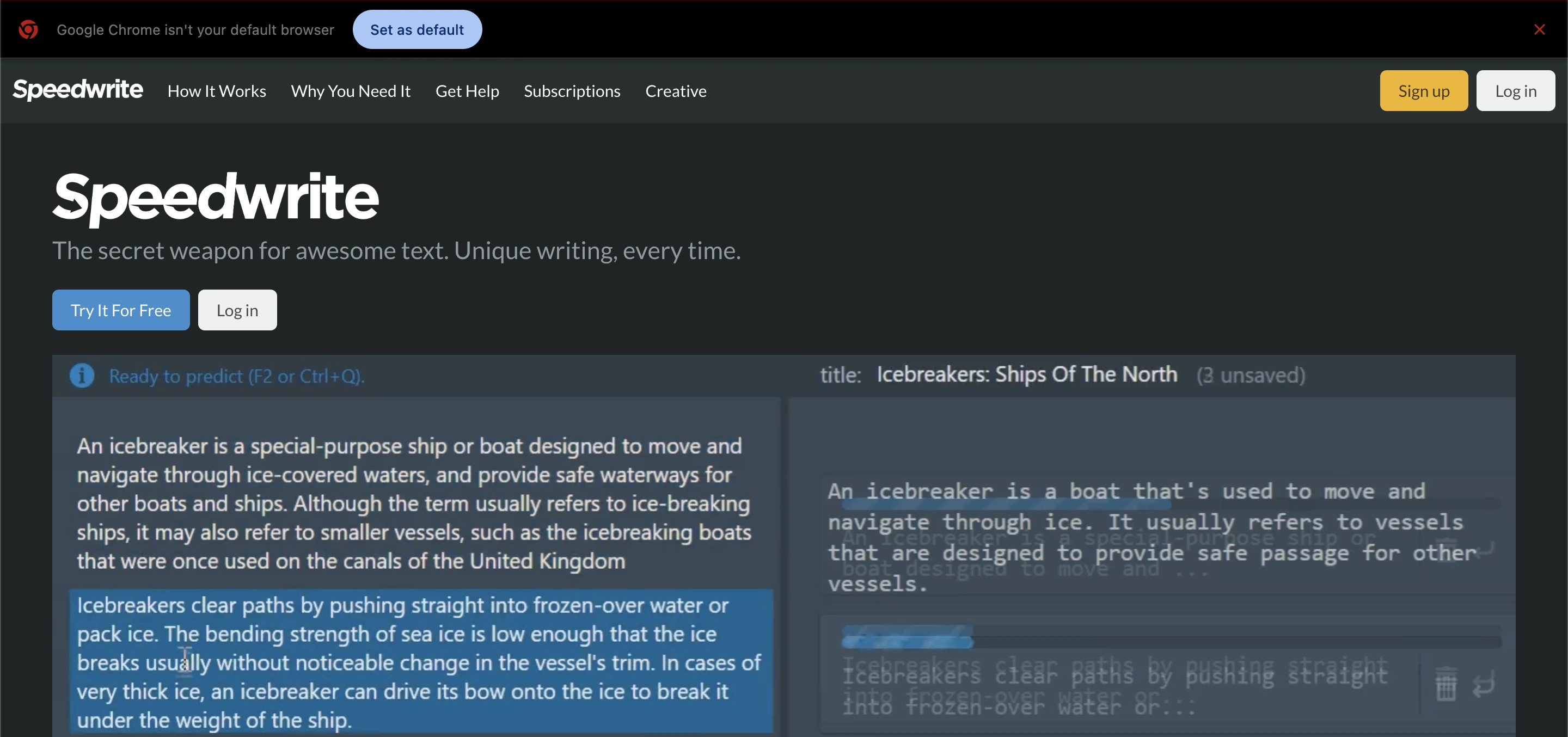 The idea is simple: you provide text or your own research notes, and it turns that into something new that has the same meaning but different wording. This makes it ideal for creating essays, articles, reports, or blog posts quickly.
Why You Should Consider It
Not all writing tools are created equal. Some simply rewrite text in ways that remain too close to the original, which can trigger plagiarism detectors used by schools, businesses, or search engines.
Rephrase AI addresses this by generating text that is significantly different from the original input while preserving the intended meaning.
It offers several benefits: the output is unique every time, reducing the risk of duplication; it delivers fast results, helping you overcome writer’s block; the generated text is generally easy to read and grammatically smooth, improving readability; and the tool is user-friendly, requiring no special skills to use.
How Speedwrite Works
Using speedwrite is simple and does not require advanced knowledge. Here’s a basic step‑by‑step guide:
Paste Your Text Source
You can use a paragraph from your notes, a draft you wrote, or text from any public source (such as creative‑commons data).
Click the Predict Button
Speedwrite generates a predicted version of your input text that is original and changed in wording.
Review and Edit
After speedwrite creates the content, you should read it and correct any factual or stylistic errors before using it.
Export or Copy
You can then export the final text or copy it into your favorite editor.
Read Also: Best Top 5 NSFW AI Writer Tools (2025 Guide)
How to Get Started with Speedwrite
Getting started with Speedwrite is simple and doesn’t require any technical knowledge. Even beginners can start generating unique, high-quality text in just a few steps. Follow this guide to make the most of the tool:
Sign Up for an Account To use it, you first need to create an account on the official website. You can start with the free trial to test the features before subscribing to a paid plan. Make sure to confirm your email address to activate your account.
Choose Your Plan After signing up, select a plan that fits your needs. Free trials usually offer a limited number of predictions, while paid plans give access to more rewrites and advanced features like Creative Mode.
Input Your Source Text Once your account is ready, you can paste your text, notes, or draft content into the text box. The source text can be anything from research notes, rough drafts, or even paragraphs from previous work. The better your input, the better the output.
Click the Predict Button After adding your source text, click the Predict button. Speedwrite will process your input and generate rewritten content that is unique and readable. This usually takes just a few seconds for short texts.
Review and Edit the Output Even though Speedwrite produces readable text, it’s important to review the generated content. Check for accuracy, grammar, and style to ensure it meets your needs. Editing at this stage ensures professional-quality results.
Use Creative Mode (Optional) If you only have short ideas or bullet points, you can use Creative Mode. This feature expands your notes into complete paragraphs, making it perfect for brainstorming or developing content from scratch.
Export or Copy the Text After reviewing and making any necessary edits, you can export the content or copy it into your preferred editor, such as Microsoft Word, Google Docs, or your website’s CMS.
Start Creating More Content Once you’re familiar with the interface and workflow, you can use Speedwrite to generate multiple pieces of content efficiently. This can save hours of manual writing and help maintain originality across projects.
Key Features
1. Unique Content Generation
The primary strength is its ability to create content that does not match the original input text. The output is written freshly enough to pass most plagiarism checks when properly edited.
2. Rapid Text Rewriting
Speedwrite can rewrite large amounts of text quickly. You no longer have to spend hours editing or paraphrasing manually.
3. Improved Grammar and Style
Unlike simple paraphrasing tools that often produce awkward output, speedwrite tries to craft text that flows naturally in English.
4. Creative Mode
This mode lets you input short sentences or rough ideas, and speedwrite expands them into more detailed, well‑formed paragraphs. It is useful when you want to develop your thoughts further.
5. Simple User Interface
You don’t need advanced skills to use speedwrite. It works with basic commands and a clean, easy layout.
6. Export and Integration
Once you finish, you can export or copy your writing to another editor, like Google Docs or Microsoft Word.
Read Also: Scholar GPT: Smart Research & Study Assistant
Use Cases
1. Academic Writing
Students can use it to turn research notes or draft paragraphs into original essays or reports. By carefully reviewing the output for accuracy, students can avoid accidental plagiarism.
2. Content Marketing
Bloggers and SEO professionals often need a large volume of fresh content. It helps generate unique articles or rewrite existing material so that it fits a new audience or topic.
3. Business Communication
Professionals who write proposals, reports, or presentations can use speedwrite to turn basic drafts into polished content that looks professional and clear.
4. Creative Projects
Writers can use the Creative Mode to build paragraphs from short idea notes. This makes it easier to work on opinion pieces, personal essays, or stories.
Pros and Cons
Pros | Cons |
|---|---|
Generates unique content from source text. | Outputs may need careful fact-checking and editing. |
Fast and efficient for quick writing tasks. | Not a full writing suite like tools with built-in grammar checkers or citation helpers. |
Helps avoid basic duplication issues. | The quality depends on the quality of the original input text. |
Easy to use, even for beginners. | - |
Creative Mode expands rough ideas into paragraphs. | - |
How Speedwrite Compares to Other Tools
Many writing assistants exist today. However, speedwrite stands out for its focus on producing unique, rewritten text instead of summarizing or rephrasing the same words.
Other tools like grammar checkers focus on fixing errors, while paraphrasers change some words. It tries to blend rewriting with style improvement and originality. This makes it particularly useful for content creation tasks where unique output matters most.
Pricing and Plans
Speedwrite offers a range of subscription options after the free trial runs out. Plans vary depending on how many predictions (rewrites) you need. Some users report monthly pricing around standard rates for writing tools, with yearly discounts available.
While speedwrite is not free long‑term, the investment may be worth it if you frequently write content and want to save time. Always check the latest pricing on the official site before subscribing.
Tips for Getting Better Results
Keep these tips in mind when using Rephrase AI: provide high-quality input, as better source text leads to better output; always edit after generation to check facts and style; use Creative Mode when you only have rough points to generate initial ideas; and break long paragraphs into smaller chunks, which helps the tool produce more accurate text.
Conclusion
In summary, speedwrite is a useful online writing assistant that focuses on creating unique, high‑quality content quickly. Whether you are a student, writer, marketer, or professional, It can help you rewrite your drafts into fresh, readable text.
While it is not a complete all‑in‑one writing suite, its strength lies in originality and speed of rewriting. By combining speedwrite with good editing practice and clear input material, you can save time and produce engaging content that stands out.
Frequently Asked Questions (FAQs)
What is Speedwrite?
Speedwrite is an AI-powered writing tool that rewrites your text into unique, readable content quickly. It is designed to help users produce original text without copying the source.
Who can use Speedwrite?
Students, bloggers, marketers, professionals, and anyone who needs to create high-quality text quickly can use Speedwrite. No special writing skills are required.
How does Speedwrite work?
You provide a source text or notes, and Speedwrite generates rewritten content that maintains the original meaning but uses fresh wording. You can then edit or export the result.
Is Speedwrite free to use?
Speedwrite offers a free trial, but long-term access requires a paid subscription. Pricing depends on the number of predictions or rewrites you need.
Can Speedwrite replace human writing?
Speedwrite is a tool to assist writing, not replace it. Users should review and edit the generated content to ensure accuracy and style quality.